Deployment Guide
1. Introduction
Purpose of this document:
This document provides high-level guidance for deploying SmartOfficeNXT within a client tenant, silo-based setup. It outlines the essential steps required to install the solution, configure integrations, and ensure that all components function correctly within the target Microsoft 365 ecosystem.
Scope:
This guide covers the following areas of deployment at a conceptual and implementation-ready level:
- Preparing the target Microsoft 365 tenant
- Deploying the SmartOfficeNXT SPFx package to SharePoint Online
- Configuring solution settings, lists, libraries, and platform components
- Deploying and enabling Power Automate workflows
- Integrating with Microsoft Teams, Outlook, and Azure services
Target audience:
This document is intended for:
- Client IT Administrators
- Implementation / Deployment Teams
- Developers assisting with tenant onboarding Deployment Architecture
SmartOfficeNXT is built using a modular architecture that integrates seamlessly with Microsoft 365 services. The deployment model centers around scalability, security, and ease of management.
The platform consists of five core layers:
- Hosting Layer SmartOfficeNXT is deployed as a SharePoint Framework (SPFx) application, hosted entirely within SharePoint Online.
- Data Storage Layer Application data—such as forms, workflow metadata, and attachments—is securely stored in SharePoint Lists and Libraries.
- Workflow & Automation Layer Power Automate is used to power approval flows, notifications, reminders, escalations, and other automation logic.
- Notification & Communication Layer SmartOfficeNXT integrates with Outlook and Microsoft Teams to deliver alerts, approvals, and real-time communication updates.
- Security & Access Layer Authentication and access control are handled through Microsoft Entra ID (Azure AD), enabling secure, role-based access across the platform.
Architecture Diagram:
The diagram below illustrates the deployment architecture across the source and target environments, highlighting how these layers integrate to support both internal and client deployments.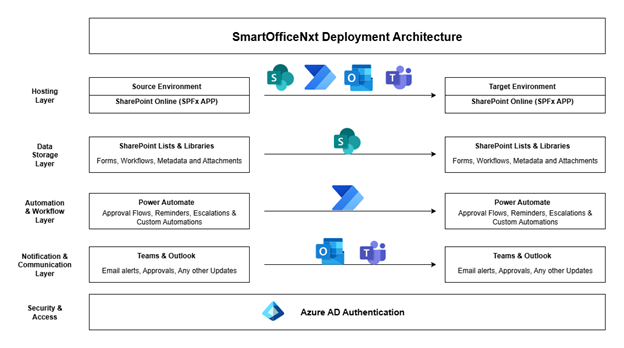
Deployment Scenarios
SmartOfficeNXT supports multiple deployment approaches:
- Client Deployment – Solution deployed into a single client tenant.
- Silo Deployment – Independent, isolated deployment for each business unit or customer.